Someone sends me a screenshot of their Google Tag Manager container and asks why the numbers do not match. GA4 says one number of purchases, Meta says another, TikTok is lower, Snap is zero. Four dashboards, one store, and no two of them agree on the same week.
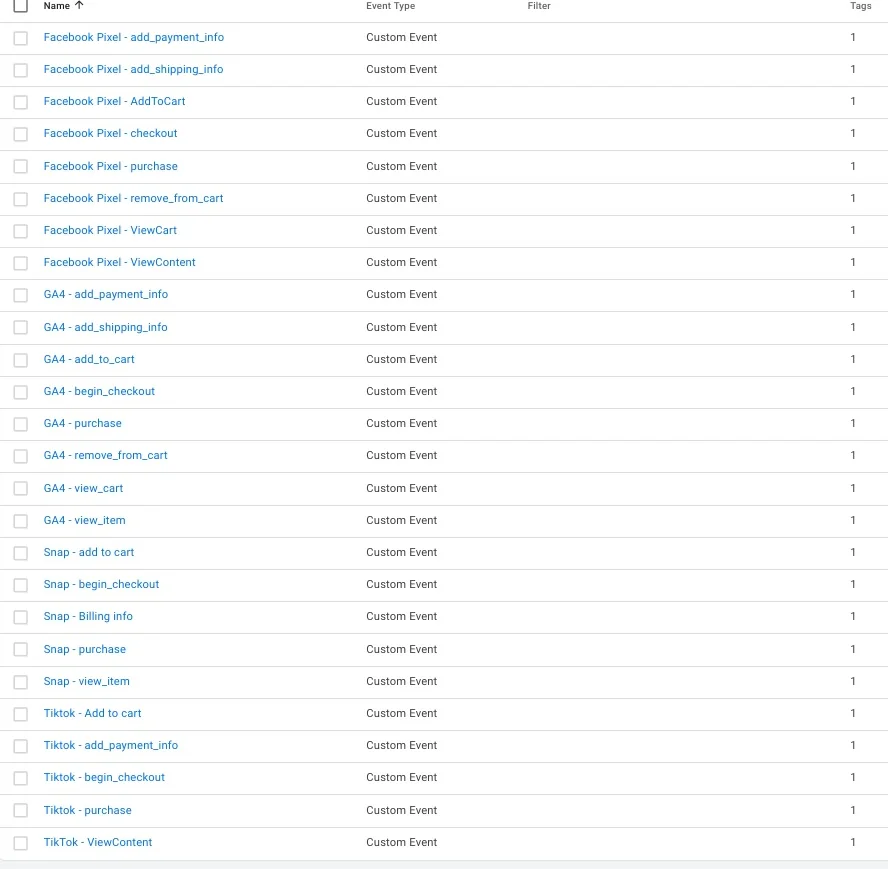
The container in the screenshots below arrived with that question attached, and it answered most of it before I opened a single dashboard. Twenty-six triggers, four platforms, every one of them firing from a data layer event.
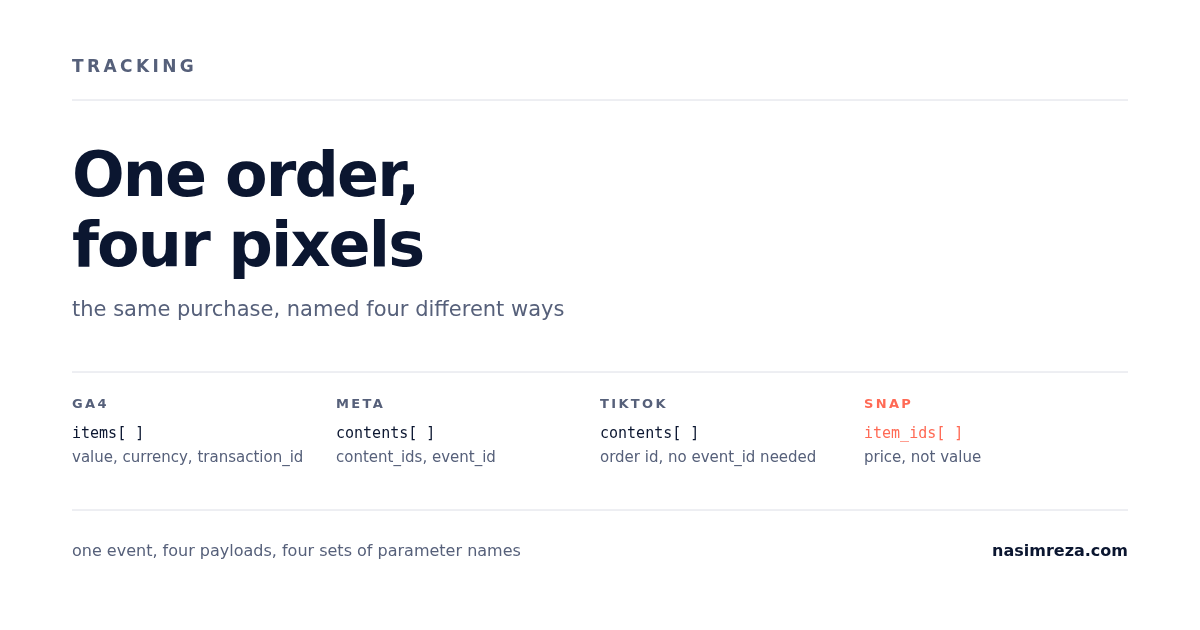
When one order leaves the store, it gets copied four times, and each copy has to be translated into a different vocabulary. GA4 wants a product array called items. Meta wants contents and content_ids. TikTok wants contents but calls the purchase PlaceAnOrder. Snap wants item_ids and a field called price where everyone else says value. One spelling mistake in the middle of that, and the order exists in the store and nowhere else.
Here is what each of the four translations is actually doing in that container, tag names exactly as the account has them.
Twenty-six triggers, four platforms
The Triggers screen tells you most of the story. This container has 26 custom event triggers: eight for GA4, eight for the Meta pixel, five for Snap and five for TikTok. Every one of them fires from a data layer event, and every one of them has exactly one tag attached, which is the shape a careful setup leaves behind.
| Platform | Events in this container | What the purchase is called |
|---|---|---|
| GA4 | view_item, add_to_cart, remove_from_cart, view_cart, begin_checkout, add_shipping_info, add_payment_info, purchase | purchase |
| Meta | ViewContent, AddToCart, ViewCart, checkout, add_shipping_info, add_payment_info, remove_from_cart, purchase | Purchase |
| TikTok | ViewContent, Add to cart, add_payment_info, begin_checkout, purchase | PlaceAnOrder |
| Snap | view_item, add to cart, begin_checkout, Billing info, purchase | PURCHASE |
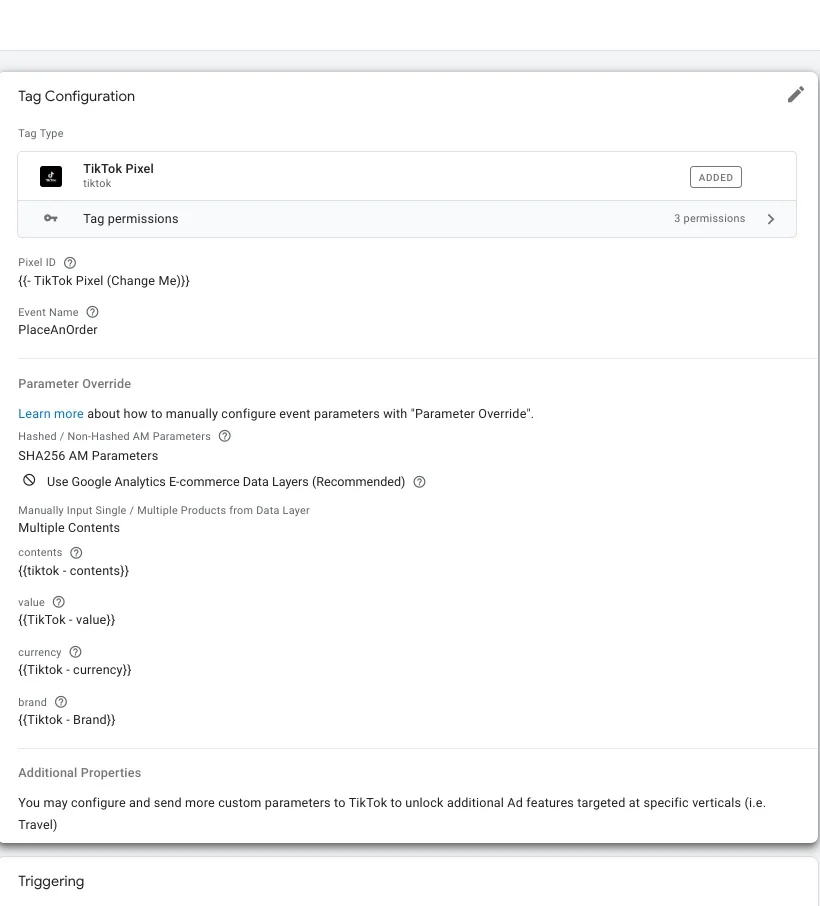
Two things jump out of that table, and neither one is a bug in the usual sense. TikTok's purchase event is not called Purchase. It is PlaceAnOrder, and if you send purchase the way you send it to GA4, the platform treats it as a custom event. Custom events still arrive. They just do not feed the standard purchase reporting or the catalog matching the way a standard event does, which is the kind of problem that only shows up three weeks later when someone asks why TikTok ROAS is flat.
The second problem is drift in the names. The same account will show a tag called Facebook Pixel - begin_checkout sitting on a trigger called Facebook Pixel - checkout, one event under two labels because one person built the trigger and another built the tag. It works today, and it is exactly what breaks when someone copies the folder next month and cannot tell which one is live.
The same four names mean four different things
Before you look at a single tag, it helps to know what each platform refuses to work without. Strip away the branding and every purchase event is four facts: what was bought, how many, what it cost, and which order it was.
| What you are sending | GA4 | Meta | TikTok | Snap |
|---|---|---|---|---|
| the products | items (array) | contents and content_ids | contents | item_ids |
| the order total | value | value | value | price |
| the money | currency | currency | currency | currency |
| the order | transaction_id | order_id, plus event_id for dedup | event_id | transaction_id, plus client_dedup_id on the pixel |
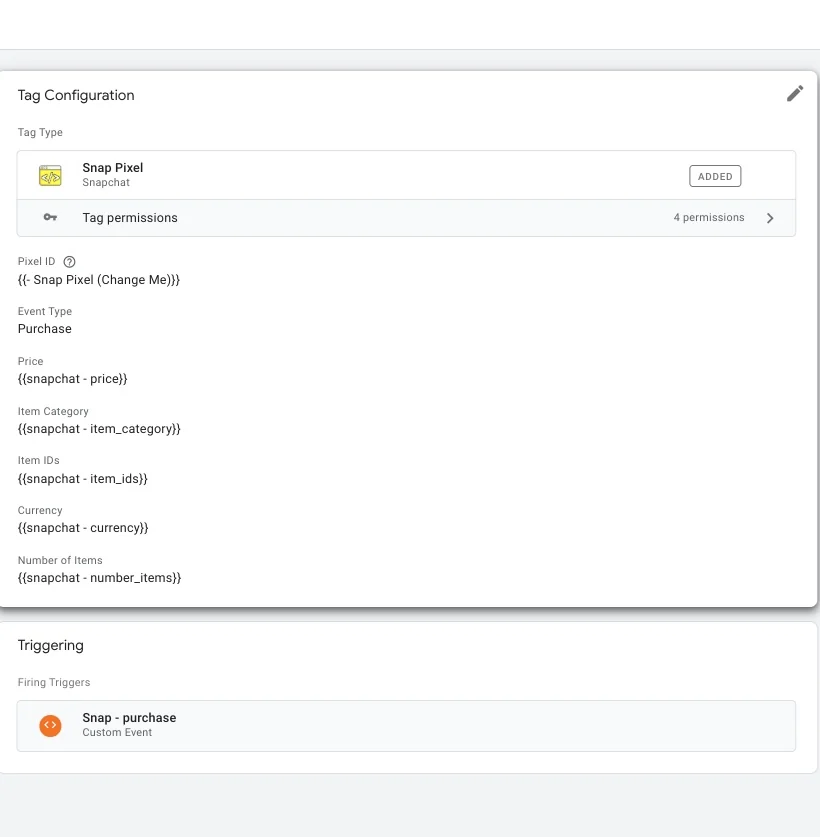
Snap is the one that catches people. Every other platform calls the number value. Snap's pixel asks for price. A mapping copied from a GA4 tag into a Snap tag will pass a parameter called value, the platform will accept the hit, and the purchase will land with no revenue attached. Nothing errors. You find out when the Snap dashboard shows purchases and a number close to zero.
Meta, and the field nobody maps
Meta's tag is the most carefully built of the three. Ten properties: content type, content name, content ids, value, currency, action source set to website, order id, number of items, contents, and content category. Somebody sat down with Meta's reference and mapped the product array properly. Most tags I open have value and currency and stop there, which is why their catalog and their dynamic ads never quite line up with the store.
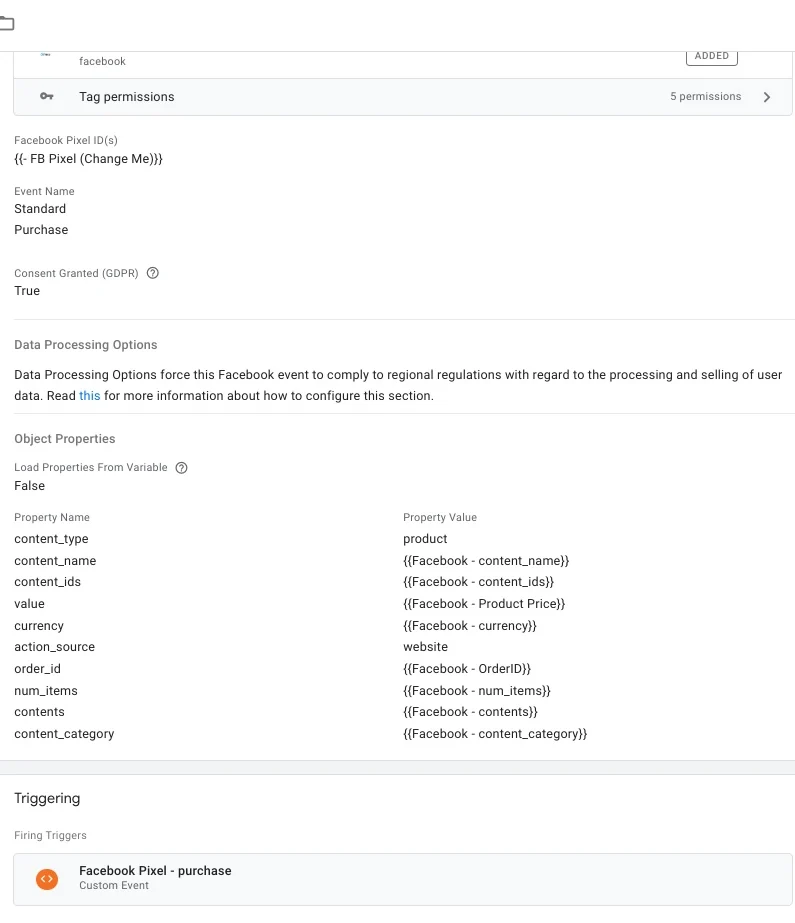
event_id is not one of them. That is the cheapest insurance in the whole container and almost nobody buys it.The missing one is event_id. Meta deduplicates a browser purchase against a Conversions API purchase on that single value: send the same string from both sides and the second hit is dropped instead of added. Leave it out, run a pixel and CAPI at the same time, and every order reports twice. Nothing errors. The ROAS just looks excellent until someone reconciles it against Shopify and finds the store took half the money the dashboard claims.
The tag also maps order_id, which is the right field for reports and the wrong field for deduplication. They are two different jobs and Meta wants both. I have a separate walkthrough of the CAPI side for the day you turn the server on, and this is the first thing I check in the browser tag before I touch it.
TikTok runs the same idea on different names. It matches on event_source_id, the event name, and event_id. Two copies inside five minutes get merged, anything after 48 hours gets dropped. So if the Events API is on your roadmap, put the order id into the pixel tag now, while someone still remembers which data layer variable holds it.
Snap splits it in two. The pixel carries client_dedup_id, the server event carries event_id, and the two have to be identical strings. For purchases Snap also accepts transaction_id against order_id with a 30 day window, which is generous enough that a retried order still collapses into one conversion. Generous, and useless if neither field is in the tag, which is the case here.
So the honest reading of this container: GA4 is complete, Meta is complete except for the one field that matters when you go server side, TikTok and Snap have their purchase parameters but no dedup key at all, and all four are browser only. That is not a broken setup. It is a setup with a date on it, and the date is the day someone turns on CAPI or the Events API and the numbers double overnight.
One decision sits above all of this and I keep it out of the mapping discussion because it is a different question: whether the tag should live in the container at all. On Shopify, some of these events belong in a web pixel instead of GTM, and the pixel versus container split is worth settling before you rename a single parameter.
Reading a container by its variable names
One detail in those screenshots is worth a paragraph because I see it in most accounts. The pixel id fields read {{ Snap Pixel (Change Me)}} and {{- TikTok Pixel (Change Me)}}. Those are the template's default variable names, still carrying the words Change Me months after the setup went live.
Sometimes the value behind them is correct and only the name is ugly. Sometimes it is not. You cannot tell from the tag screen, and neither can the next person who inherits the container. Renaming those variables is a five minute job that saves an hour of guessing later, and it is the first thing I do when I open an unfamiliar container: open Variables, look for anything with Change Me, TODO, or a client name from two years ago in it.
The order I fix these in
Not by platform. By direction. The store is the source of truth, the data layer is the translation, and the four platforms are consumers. Work backwards from the store and every platform gets the same numbers.
- One real order through the store, with the data layer open in the console. Confirm the order value, currency and order id are there as plain values, not as a formatted string with a currency symbol glued to the front.
- Fix the GA4 purchase tag first. It has the strictest product array and the cleanest debugging through DebugView, so a correct GA4 event is a good reference payload for the rest. The five causes of a zero value purchase covers the failure modes.
- Copy that payload outward, renaming fields per platform, and check each tag in Preview mode against the same order.
- Add the dedup id to the browser tag before you add any server side integration, not after.
The test at the end is not a dashboard. It is one order, four Events Manager or DebugView screens, and the same order id visible in all four. If any platform shows two purchases for that one order, the dedup field is missing on one side. If any platform shows a purchase with no value, the mapping is wrong on one field. Both answers come in under twenty minutes, and neither one needs a new tool.
What I would not do is touch all four platforms in one sitting. Fix GA4, place an order, write down what arrived. Then Meta, then the other two. Four platforms changed at once means four possible causes for the next discrepancy, and by then nobody remembers which change did what.
If you want to check your own container before changing anything, the 14-point tracking checklist covers the parameter and dedup checks without needing GTM access. If you would rather have someone name the mismatch and fix it, the read-only tracking audit is $99 and comes back as a written report on which events are wrong, on which platform, and what it is costing you. A $19 15-minute call is usually enough to say whether your problem is one field or the whole container.
Want this set up properly in your own account? Fixed-price packages from $1,250, read-only audit first — or ask one question on a $19 call.